HP support website for the software drivers
and ROM upgrades
DAVE'S
REVIEW CENTER
Read
my reviews here for the latest Ipaq accessories
HP iPAQ Hardware Review
by Daves iPAQ
Its
7:00am on Monday June 23, 2003 and my new h2215 iPAQ PocketPC
alarm goes off. With my eyes still shut I turn over in my bed
to turn the alarm off and unfortunately my hands shuffles around
as I cannot find the new kid on the block? I open my eyes and
notice the extremely small and brilliant crafted h2215 iPAQ sitting
on the ledge of my night stand. As I glance over it I cant help
but not look back at the soon to be extinct 31xx-39xx days and
wonder what this little baby has in it? Well hang on because HP
has delivered a small and brilliantly designed iPAQ.
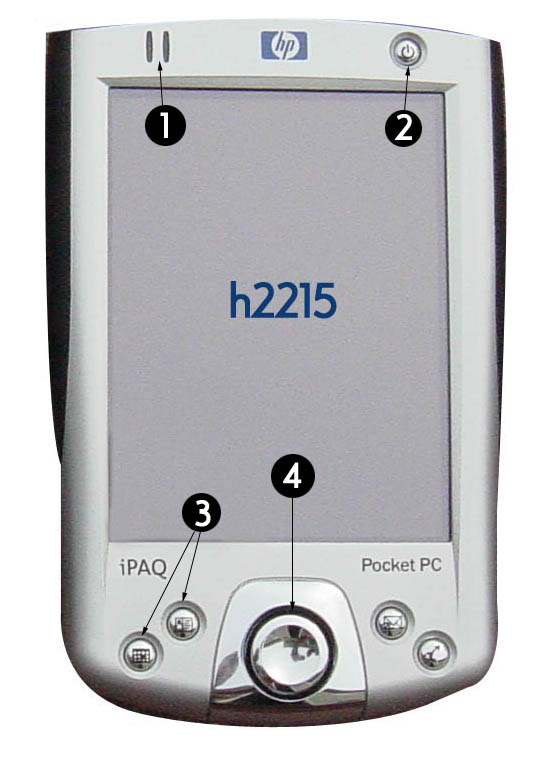
If you glance over at the h2215 (left click
on image to make larger) you will notice the button layout.
Area #1 is the new charging/bluetooth indicator lights.
As you engage Bluetooth you will notice the second light in Area
#1 will turn a flourescent blue. If you aren't familiar with
Bluetooth, Bluetooth™ wireless technology revolutionizes the personal
connectivity market by providing freedom from wired connections
- enabling links between mobile computers, mobile phones, portable
handheld devices, and connectivity to the Internet. Interface,
synchronize, exchange? All of the above, and more. Bluetooth technology
redefines the very way we experience connectivity. Area #2
is your power button in which seems to be quite snug its socket.
Area #3 are from left to right calendar, contacts, inbox and
iTask. Area #4 shows the newly designed jog dial in which
nicely fits into your thumb giving the end user the capability
to scroll throughout the PocketPC 2003 OS. Score A
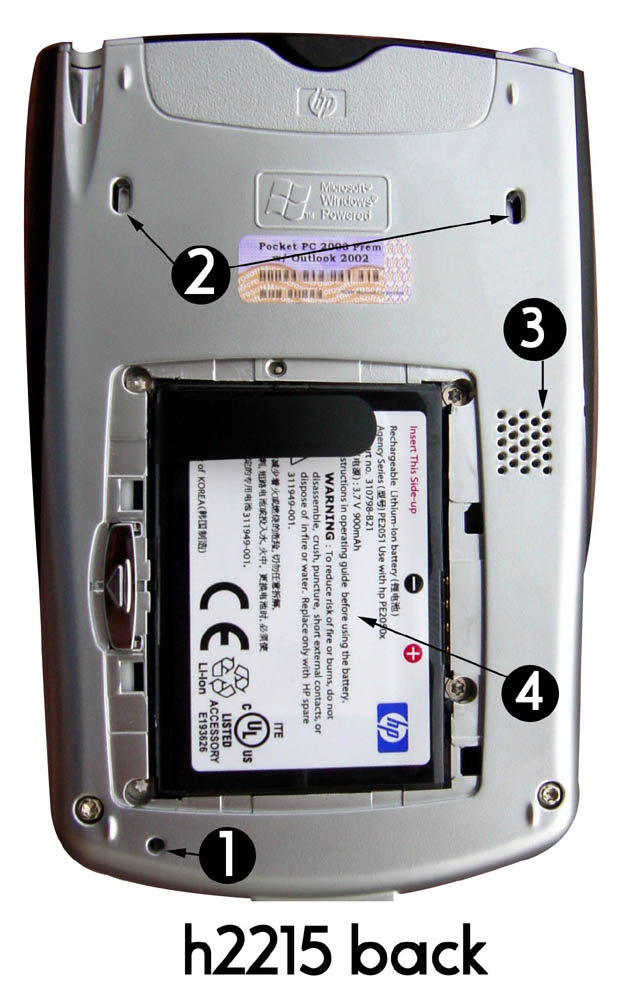
The back of the h2215 iPAQ (right) is a
bit different than the other series. Area #1 is your reset
button, something I have not had the need to hit. As you move
up the Area #2 you will notice two slots that go unmentioned
throughout the entire user manual. I would think they are for
some sort of expansion jacket? I cannot confirm this but one would
think that is what it's for. Area #3 is the speaker, yes
the speaker! HP made a decision on this model to integrate the
speaker onto the back of the unit. I would only guess this is
because of the SD/CF slot on the top of the iPAQ. Many of you
diehards will complain about this but comon you can't have your
cake and eat it too!.er the fence. Area #4 is the removeable battery
pack. HP did a nice job securing the door for the battery compaired
to the h1910 it is a big improvement. Also the battery pack offers
900mAh of power. Overall the back if the iPAQ is the only downfall.
I feel that 90% of the time I am covering the speaker. Well, I
guess hearing my clicks doesn't
make that big of a difference. Score B-
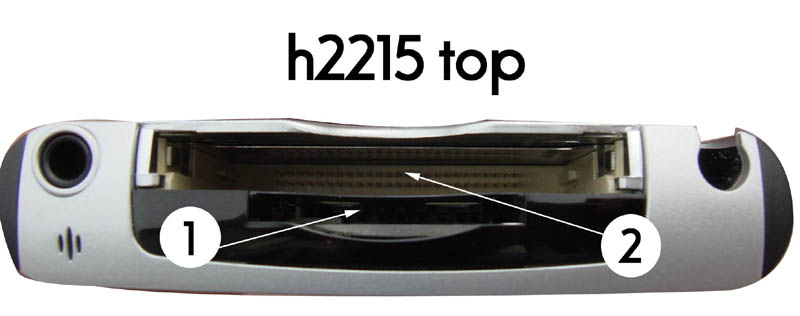
The top of the h2215 iPAQ has to be the biggest
improvement for the iPAQ family. FINALLY we now have integrated
SDIO and Compact Flash, plus with NO SLEEVES. I can't tell you
how many doors this opens for the iPAQ when dealing with accessory
options (be sure to read my review of the CF Convergence GSM/GPRS
card that works on the h2215!) The newly designed top features
a microphone, Area #1 Secure Digital IO slot and my favorate
Area #2 Compact Flash slot! Also for those 31xx-39xx users,
no more springs in the stylus silo, which means no more broken
silos. Overall the design changes on the top of the h2215 get
my high score. Score A+
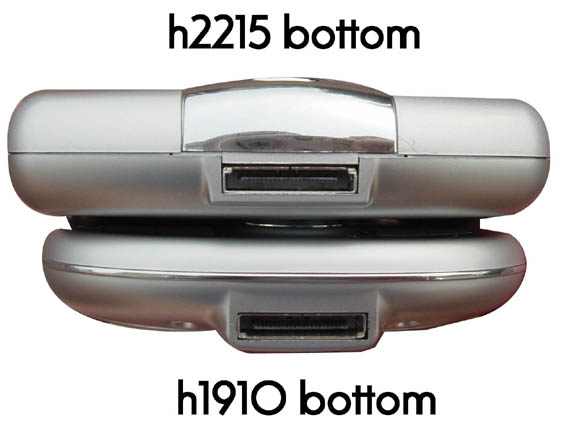
The bottom of the new h2215 iPAQ really doesn't
change which is good and I will tell you why. I recentlyreceived
a Think Outside
Stowaway XT keyboard which is for the 5xxx series iPAQ. Well
you guessed it, it works also for the h2215. When combined this
little package fits nicely in your pocket! You will also notice
compaired to the h1910 the 2215 is almost double the thickness.
I really can't say this is bad since it adds more meat to the
handheld making the unit feel more durable. Hands down great job
HP for keeping the h2215 compatable with some of the h5xxx keyboards
and other expansion capabilities. Score A
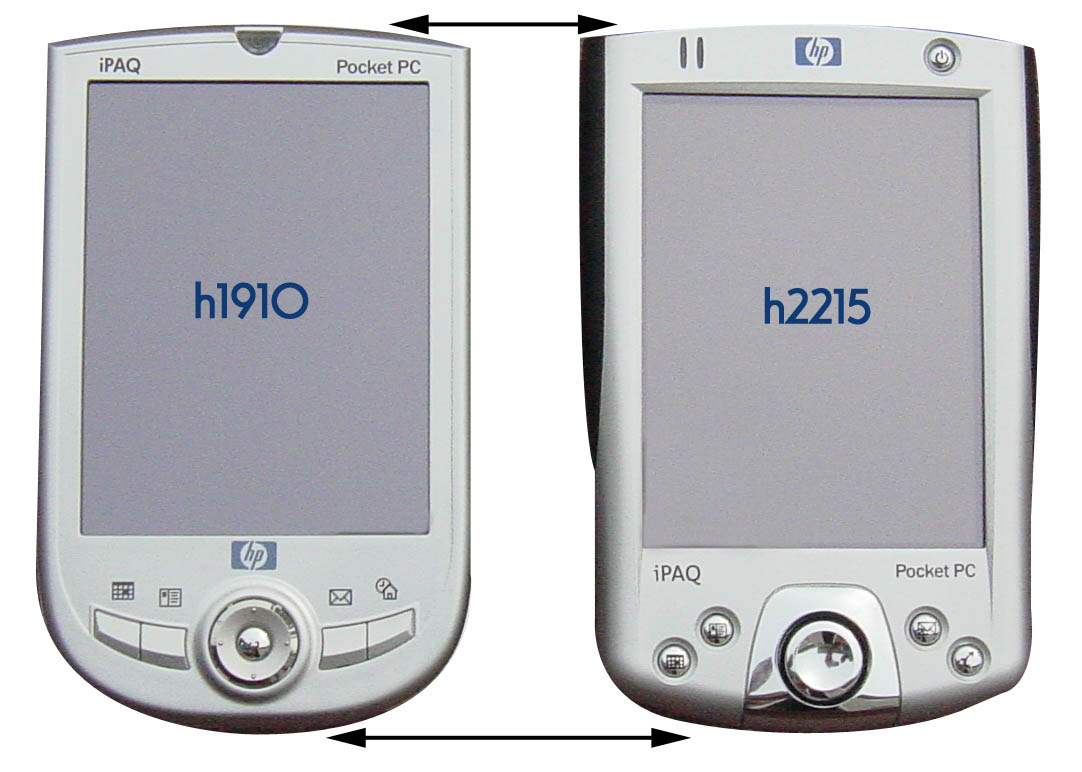
I
thought this picture (left) explains it all! Yes your eyes are
not deceiving you the h1910 and the h2215 are identical in height.
You have to admire HP for keeping the size factor down in the
h2215 especially since we all loved the size of the h1910. You
will also notice the sides of the h2215 now have rubber grips,
The rubber grips are a great addition to the handheld. I can't
tell you how many times I dropped my iPAQ's and always screamed
"why cant they make this with rubber grips!"
Well I think I screamed loud enough for HP to hear. Only kidding.
But overall I have to say the grips make a tremendous difference.
Not only does the unit feel small in your hand it feels durable,
something I could not say about the h1910. Once again form factor
is HP's specialty and we all benefit from it in the h2215 iPAQ.
Score A+