





 |
Spb Software House announces Pocket Plus 2.0, the most significant release yet of this award-winning application. One of the most popular applications on the market today, Pocket Plus was the #1 selling application at PocketGear for the last two years. The design philosophy behind Pocket Plus has always been focused on one task: to address the shortcomings of the Windows Mobile operating system through strategic enhancements to the existing system. Rather than writing a new Web browser for instance, Pocket Plus enhances and improves the Web browser that comes with all Pocket PCs.
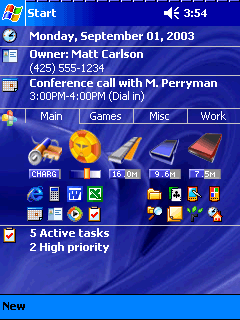
The Today screen will never be the same again - Pocket Plus boasts a completely redesigned Today screen plugin with myriad of features. Shortcuts to programs, folders and files can have large or small icons modes, and it's easy to switch between them by a quick tap and hold. Icons can be re-arranged on the Today screen with a simple drag and drop, and they can be organized into different groups using the new tabs feature. New levels of customization are achieved through the use of Extended Themes, a special type of theme for Pocket Plus 2.0. Extended themes include the normal background wallpaper and colour changes, but they also include new icons a battery indicator designed to complement the theme. Extended Themes will make your Pocket PC look better than ever, and with over 20 free themes included, it's simple to start customizing immediately.
The File Explorer has also been enhanced in several ways - users are now able to compress files using a quick "zero step" ZIP option available as a tap and hold option on any file(s). With files full of text-based information such as Word and Excel files, compression levels can surpass 300%, resulting in significant savings if the users carry large documents with them. The "Folder Up" button has been added to the File Explorer to assist in rapidly moving upwards through a folder structure. Gleaning important file details is now easier with the addition of a tap and hold Properties option - this allows the user to see the full file name, file extension, location path, and file attributes (Read-Only, Hidden, Archive, System, ROM File). Additionally, users can tap and hold on a folder to get the total size, and quickly format storage cards.
Pocket Internet Explorer has also been enhanced - in addition to the features included in the first version of Pocket Plus, 2.0 adds several key improvements. Pictures can now be saved by tapping and holding on any image, source code for the Web page can be viewed, and HTML pages can be saved for offline use. The multiple window functionality and full-screen browsing remain as useful as ever. Overall usability has been enhanced through the use of an always-visible battery level indicator in the top taskbar. The subtle measurement bar makes it easy to see your battery level at a glance, but doesn't take up more than a sliver of valuable screen real estate.
Spb Pocket Plus 2.0 will be available in English, German, Italian, Spanish, French, and Russian languages upon release. A free 15-day trial can be downloaded, or Spb Pocket Plus can be purchased for $14.95 USD, from www.spbsoftwarehouse.com. Owners of Pocket Plus 1.x can upgrade for $7.45 USD. Further details about the upgrade process are available at the Spb Software House Web site.
Further Information and Downloads
Further information regarding Pocket Plus 2.0 can be found on the Spb Web site:
http://www.spbsoftwarehouse.com/products/pocketplus/
Features demonstrated through screen shots:
http://www.spbsoftwarehouse.com/products/pocketplus/screenshots.html
A free 15-day trial can be downloaded from:
http://www.spbsoftwarehouse.com/products/pocketplus/download.html
About Spb Software House
Spb Software House is a software development company, specializing mainly in Pocket PC software. Founded in 1999, the company offers advanced software solutions for use in a wide range of applications.
